> For the complete documentation index, see [llms.txt](https://docs.simkl.org/how-to-use-simkl/llms.txt). Markdown versions of documentation pages are available by appending `.md` to page URLs; this page is available as [Markdown](https://docs.simkl.org/how-to-use-simkl/core-features/watchlists-and-custom-lists/custom-lists/custom-lists-features.md).
# Custom Lists Features
SIMKL Custom Lists give you much more than a simple collection of titles.
Each Custom List includes tools for organizing content, discovering similar lists, following other members' collections, collaborating, sharing, cloning, and quickly understanding how a list is maintained.
Whether you're creating your own carefully curated collection or browsing a list created by another SIMKL member, the list page provides useful information and actions directly from one place.
This guide explains the main features and controls available on SIMKL Custom Lists.
## What Are Custom Lists?
Custom Lists allow SIMKL members to create personalized collections of **TV Shows, Anime, or Movies** around virtually any theme.
For example, you could create lists such as:
* Best Mind-Bending Movies
* Favorite 1990s Anime
* Sitcoms to Watch
* Korean Crime Dramas
* Movies Based on True Stories
* Best Horror Movies by Decade
* Australian TV Shows
* Award-Winning Anime
* Personal Recommendations
* Upcoming Movies I'm Interested In
{% content-ref url="/pages/KasG1grJQn3SZWnpHYLg" %}
[Custom Lists](/how-to-use-simkl/core-features/watchlists-and-custom-lists/custom-lists.md)
{% endcontent-ref %}
Lists can be created for personal organization or shared publicly so other SIMKL members can discover and use them.
Depending on the type of list and its settings, visitors may also be able to **Like, Follow, Clone, Share, or Suggest titles** for the list.
***
## 1. Understanding the Custom List Page
At the top of every Custom List, SIMKL displays important information about the list and its creator.
This area can include:
* List title
* List description
* List creator
* Account status such as PRO or VIP
* Creation date
* Last updated time
* Number of collaborators
* Likes
* Followers
* Keyword tags
* Related collection lists
* List-management actions
This makes it easy to understand what the collection is about, who maintains it, and whether it is still being actively updated.
***
### A) Like a Custom List
Found a list that you enjoyed or found useful? Select **Like this list** to show your appreciation.
Likes provide a simple way for members to support useful community-created collections.
For example, if you discover a detailed collection of hundreds of mind-bending movies that saves you hours of searching, you can Like the list to show the creator that you found their work valuable.
The total number of Likes can also be displayed near the top of the list.
After liking a list, the option changes to indicate:
> **You liked this list**
You can remove your Like later if you change your mind.
***
### B) Follow a Custom List
Select **Follow this list** when you want to keep a particular Custom List connected to your SIMKL account.
This is especially useful for lists that continue to grow or are regularly maintained.
For example, you might follow:
* Upcoming streaming releases
* Best movies of the current year
* Seasonal anime recommendations
* Recently released TV shows
* Award winners
* Country-specific movie collections
* Frequently updated recommendation lists
When you're already following a list, SIMKL clearly indicates:
> **You're following this list**
This makes it easy to distinguish lists you're actively following from lists you've simply visited or liked.
***
### C) Edit Your Custom List
When viewing one of your own Custom Lists, the list actions menu provides an **Edit this list** option.
This gives list owners quick access to the list editor without having to navigate through their profile or list-management pages first.
From the editor, you can manage the list's configuration and content depending on the available list features.
This is useful when you notice something while viewing the finished list and want to immediately make a correction or update.
***
### D) Create a New List
The **+ New List** button provides a quick shortcut for creating another Custom List.
You don't have to leave the current list and navigate through several pages to start a new collection.
For example, while working on:
> Best Mindfucks (Movies)
you may decide that the topic would also work well for Anime and TV Shows.
You can use **+ New List** to begin creating another collection immediately.
This is particularly useful for members who maintain multiple related lists.
***
### E) Clone a Custom List
See an existing Custom List that would make a useful starting point for your own collection?
Use **Clone this list**.
Cloning allows you to create your own list based on an existing list instead of manually rebuilding a similar collection title by title.
{% content-ref url="/pages/JNusEi4nOzUkPVRbYsSC" %}
[Cloning Feature](/how-to-use-simkl/core-features/watchlists-and-custom-lists/custom-lists/creating-and-managing-custom-lists/cloning-feature.md)
{% endcontent-ref %}
Your cloned version becomes your own list, which you can then customize according to your needs.
For example, someone may have created:
> Best Science Fiction Movies
You might clone it and customize your version into:
> Science Fiction Movies I Want to Watch
You can then modify your copy without changing the original creator's list.
Cloning does not give you ownership or editing access to the original list. It creates a separate list that you can manage independently.
***
### F) Suggest More Items
Some community lists display an option such as:
> **Suggest a TV Show**
This allows members to recommend a title that they believe belongs in the collection.
{% content-ref url="/pages/vquC0mUruTeJNthsyLjd" %}
[Suggestion Feature](/how-to-use-simkl/core-features/watchlists-and-custom-lists/custom-lists/creating-and-managing-custom-lists/suggestion-feature.md)
{% endcontent-ref %}
For example, if you're browsing a community-maintained list called **Sitcoms** and notice that a relevant series is missing, you can submit it as a suggestion rather than needing to contact the creator separately.
Suggestions are particularly useful for:
* Large community collections
* Genre lists
* Country-specific lists
* Recommendation collections
* Historical collections
* Frequently updated lists
The list owner retains control over the collection, while other members can help identify potentially missing titles.
***
## 2. List Information & Transparency
SIMKL provides several pieces of information directly on the Custom List page so you can quickly understand how the collection is being maintained.
### A) Creation Date
The **Created** information shows approximately when the Custom List was originally created.
For example:
> Created 3 years ago
This can provide useful context about how long the collection has existed.
***
### B) Last Updated Time
Next to the creation date, SIMKL can display when the list was most recently updated.
For example:
> Updated 11 hours ago
This is particularly useful when browsing lists related to topics that frequently change.
A recently updated list may indicate that its creator or collaborators are still actively maintaining it.
***
### C) Collaborator Count
Custom Lists can also display how many collaborators are helping maintain the collection.
{% content-ref url="/pages/2HoUFxN9sOfrRDqtYCRG" %}
[Collaborative Features](/how-to-use-simkl/core-features/watchlists-and-custom-lists/custom-lists/creating-and-managing-custom-lists/collaborative-features.md)
{% endcontent-ref %}
For example:
> 4 collaborators
This immediately tells visitors whether the list is being managed exclusively by its creator or with help from other members.
Where available, you can use the collaborator information to quickly check who is involved in maintaining the list.
Collaborative lists are useful for larger projects where several members contribute their knowledge to one collection.
***
## 3. Creator Account Badges Info
Custom Lists can display account badges beside the list creator's username.
Depending on the member's SIMKL account, you may see indicators such as:
* **PRO**
* **VIP**
* **Supporter**
These badges provide a quick visual indication of the creator's current SIMKL membership/support status.
For example, when browsing a community list, you may see the creator's username followed by a **PRO** or **VIP** badge directly in the list header.
You don't need to open the member's profile just to identify their displayed membership status.
Account badges indicate the SIMKL membership/support status displayed for that member. They do not determine whether a Custom List itself is more accurate, official, or recommended.
***
## 4. List Description
Custom Lists can contain detailed descriptions explaining their purpose, criteria, methodology, or other useful information.
* For shorter descriptions, everything may be visible immediately.
* For longer descriptions, SIMKL can collapse part of the text to keep the page compact.
#### Read More
Select **Read more...** to expand the complete description.
This can be particularly important for curated lists because the creator may use the description to explain:
* What qualifies for the list
* What has intentionally been excluded
* How titles are ranked
* What a particular category means
* Sources used to build the collection
* How frequently the list is updated
* Special rules or exceptions
Before judging the contents of a list, checking its complete description can therefore provide valuable context.
***
## 5. Keyword Tags
Custom Lists can include **keyword tags** beneath their descriptions.
For example, a mind-bending movie collection could use tags such as:
`twisted` `mindfuck` `psychological` `surreal` `cerebral` `complex` `abstract`
Tags provide a quick summary of the themes represented by a collection.
More importantly, they can act as useful **quick links for discovery**.
Selecting a relevant keyword can help you explore other lists or content connected with the same subject.
This means tags aren't only descriptive—they can also provide another route for discovering collections based on specific interests.
***
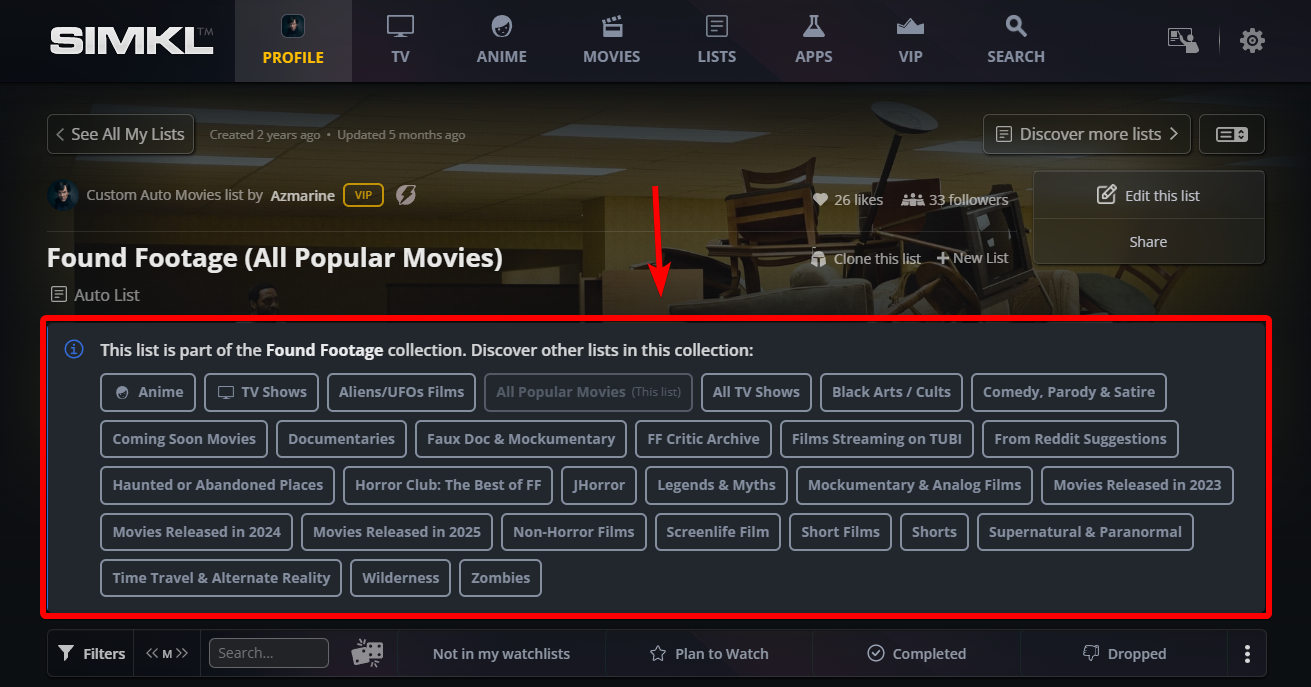
## 6. Custom List Collection Preview
Some SIMKL Custom Lists belong to a larger **collection of related lists**.
When this happens, SIMKL can display a collection preview directly on the list page.
For example:
> This list is part of the Found Footage collection. Discover other lists in this collection**:**
You may then see shortcuts such as:
**Anime | TV Shows | Aliens/UFO Films | All Popular Movies | All TV Shows.. etc**
Selecting one takes you directly to the corresponding related list.
Collections can also represent other structures.
For example, a collection about English TV Shows could contain:
**1970s Series | 1980s Series | 1990s Series | 2000s Series | 2010s Series | 2020s Series | Most Watched**
This makes it possible to build a connected network of lists instead of forcing hundreds or thousands of titles into one enormous collection.
{% content-ref url="/pages/oIUOLow1ATMTbthuscsR" %}
[Custom List Collections](/how-to-use-simkl/core-features/watchlists-and-custom-lists/custom-lists/custom-list-collections.md)
{% endcontent-ref %}
#### Why Collections Are Useful
Collections are especially useful for dividing large topics by:
* Content type
* Decade
* Country
* Genre
* Theme
* Ranking
* Popularity
* Release period
* Subcategory
When you encounter the collection panel, you can jump between its related lists without having to search for them individually.
***
## 7. List Background Images
Custom Lists can use a large background image in the header area to give each collection a more visual presentation.
For users who prefer a cleaner or more compact interface, SIMKL provides a **background-image toggle**.
Use the toggle to switch the list's background presentation according to your viewing preference.
This can be particularly useful when:
* You want improved text readability
* The background is visually distracting
* You're browsing many lists quickly
* You prefer a minimal interface
* You simply want to focus on the list contents
The control lets you change the presentation without affecting the actual contents of the Custom List.
***
## Like, Follow, Clone: What's the Difference in Custom List?
These three actions may look similar at first, but they serve very different purposes.
| Feature | What it does | Best used when |
| ---------- | --------------------------------------- | ----------------------------------------------------------- |
| **Like** | Shows appreciation for a list | You enjoyed or found the collection useful |
| **Follow** | Keeps you connected to the list | You want to keep track of an actively maintained collection |
| **Clone** | Creates your own copy based on the list | You want to customize the collection yourself |
For example, suppose you discover a list containing **100+ 3D Anime List**
* You could **Like** it because you appreciate the work
* **Follow** it because you want to keep up with the collection
* or **Clone** it because you want to turn it into your own personalized watchlist.
You can use these features independently depending on what you want to accomplish.
{% hint style="success" %}
Although **Like** and **Follow** may seem similar, they serve two different purposes on SIMKL.
{% endhint %}
**❤️ Liking a List**
Use **Like** when you find a Custom List useful, interesting, or well curated and simply want to show your appreciation to its creator.
* A Like shows that you enjoyed or appreciated the list.
* It contributes to the list's visible Like count.
* **Liking does not add the list to your My Lists section.**
* It is ideal when you want to support a creator without keeping the list in your personal list collection.
**Example:** You discover a great *Best Mind-Bending Movies* collection and enjoy browsing it, but don't necessarily need to keep track of it. You can simply **Like** the list.
**➕ Following a List**
Use **Follow** when you want to keep the Custom List easily accessible from your own SIMKL account.
* Following adds the list to your **My Lists** section.
* This makes it easier to return to lists you regularly use or want to keep track of.
* The original creator continues to maintain the list—you are following their collection rather than creating your own copy.
* SIMKL also plans to add **notifications for newly added items in followed lists**, making Follow useful for collections that are regularly updated.
**Example:** You find an *Upcoming Horror Movies* list that the creator frequently updates. Following it places the collection in **My Lists**, making it easy to revisit as new titles are added.
> You can also **Like and Follow the same list,** Like it to support the creator and Follow it to keep the collection accessible from your account.
***
## Different Controls for List Owners and Visitors
The actions displayed on a Custom List can vary depending on whether you're the **list owner**, a **collaborator**, or another SIMKL member viewing the list.
When browsing another member's list, you may see options such as:
* Like this list
* Follow this list
* Clone this list
* Suggest an item
* Share
When viewing your own list, owner-specific controls can appear instead, such as:
* Edit this list
* Create a new list
* Share
* List-management controls
Therefore, don't worry if your screen doesn't contain every button shown in this guide. SIMKL automatically displays the actions relevant to your account and your relationship with that particular list.
***
## Frequently Asked Questions
#### Do I need to create a list before I can browse Custom Lists?
No. You can browse available Custom Lists created by other SIMKL members without creating your own list first.
#### What's the difference between liking and following a list?
Liking is a way to show appreciation for a collection. Following is intended for lists you want to stay connected with, particularly collections that may continue receiving updates.
#### Can I copy another member's Custom List?
If **Clone this list** is available, you can use it to create your own version of the collection and customize that copy independently.
#### Does cloning modify the original list?
No. Your cloned list is separate from the original. Changes you make to your version do not edit the original creator's collection.
#### Can I suggest a missing title?
Some lists provide a **Suggest** option. When available, you can use it to recommend an appropriate TV show, anime, or movie for consideration by the list owner.
#### How can I tell whether a list is still being maintained?
Check the **Updated** information near the top of the page. This shows when the list was most recently updated.
#### Can multiple people maintain the same Custom List?
Yes. SIMKL Custom Lists can support collaborators. When collaborators are present, their number can be displayed alongside the list information.
#### How do I know who created a Custom List?
The creator is displayed near the top of the list page. You can also use the available member-list shortcut to explore other lists from that creator.
#### What do PRO, VIP, and Supporter indicators mean?
These are account-status badges associated with the list creator's SIMKL membership/support status. They provide a quick visual indication of the status currently displayed for that member.
#### What are the keywords underneath a list description?
These are tags describing topics, themes, genres, or concepts associated with the Custom List. They can also provide quick routes for exploring related content or collections.
#### Why do some lists have links to Movies, Anime, TV Shows, or different decades?
Those lists are part of a larger **Custom List Collection**. SIMKL displays the related lists together so you can move between different parts of the collection quickly.
#### What does Read More do?
If a list contains a long description, **Read more...** expands the hidden portion so you can read the creator's complete explanation.
#### Can I hide the large background image?
Where the background control is available, you can toggle the background presentation to make the list interface cleaner or easier to read.
#### Why don't I see the same buttons on every Custom List?
Available controls depend on several factors, including whether you're the owner, collaborator, signed-in visitor, or viewing another member's list. Individual list settings and list types can also affect the available actions.
#### How can I find more lists?
Use **Discover more lists** to continue exploring Custom Lists, or select **See All Member's Lists** when you want to browse additional collections from a particular creator.
***
## Explore SIMKL Custom Lists!
SIMKL Custom Lists are designed to be more than manually assembled groups of TV Shows, Anime, and Movies. They combine **personal organization, community curation, collaboration, sharing, and discovery** within the same system.
You can create and edit your own collections, discover lists maintained by other members, Like and Follow collections you enjoy, Clone useful lists as starting points for your own, suggest missing titles, browse related collections, explore keyword tags, and quickly see who created and maintains each list.
For list creators, these tools make it easier to build detailed collections and share them with the SIMKL community.
For everyone else, they provide another powerful way to discover something new to watch, often through carefully curated recommendations created by people with similar interests.
---
# Agent Instructions
This documentation is published with GitBook. GitBook is the documentation platform designed so that both humans and AI agents can read, navigate, and reason over technical content effectively. Learn more at gitbook.com.
## Querying This Documentation
If you need additional information that is not directly available in this page, you can query the documentation by asking a question.
Perform an HTTP GET request on the following URL with the `ask` and `goal` query parameters:
```
GET https://docs.simkl.org/how-to-use-simkl/core-features/watchlists-and-custom-lists/custom-lists/custom-lists-features.md?ask=&goal=
```
`ask` is the immediate question: it should be specific, self-contained, and written in natural language.
`goal` is what the user is ultimately trying to achieve, the reason they need the answer. Sharing it helps GitBook give you a better, more relevant answer. A goal is most helpful when it describes the outcome the user wants rather than restating the question. For example, with `ask=how do I create an API token`, a goal like `automate deployments from our CI pipeline` lets GitBook tailor the answer to that use case.
The response will contain a direct answer to the question and relevant excerpts and sources from the documentation.
Use this mechanism when the answer is not explicitly present in the current page, you need clarification or additional context, or you want to retrieve related documentation sections.