> For the complete documentation index, see [llms.txt](https://docs.simkl.org/how-to-use-simkl/llms.txt). Markdown versions of documentation pages are available by appending `.md` to page URLs; this page is available as [Markdown](https://docs.simkl.org/how-to-use-simkl/getting-started-with-simkl/basic-navigation/tv-shows-tracking/episode-tracking/specials.md).
# Specials
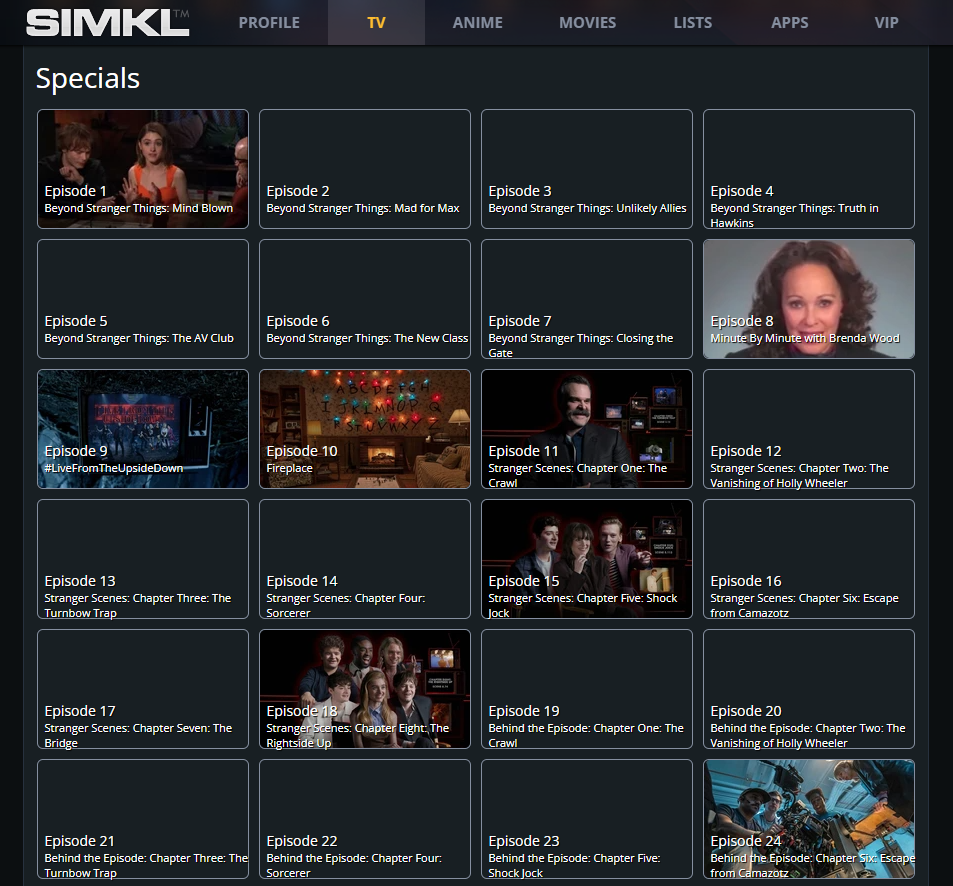
Specials on SIMKL (Episode Page Feature)
**Specials** on SIMKL are a dedicated episode-type feature designed to properly represent **non-standard episodes** such as specials, OVAs, bonus content, behind-the-scenes material, and related extras **without breaking your main watch progress**.
{% hint style="danger" %}
**Still in works:** This feature exists for both **TV shows and anime** and is currently part of SIMKL’s **v2 beta development**.
{% endhint %}
> Example:
***
## What Are “Specials” on SIMKL?
Specials are **officially released episodes or content** that do **not belong to the regular episode numbering** of a season.
A **TV special** is basically a one-off TV program that sits outside the normal flow of regular episodes.
“Special” is a broad label, so it can mean several things: a Christmas/Halloween episode, a reunion, a behind-the-scenes program, an anniversary episode, a recap, a documentary tied to the show, or sometimes a longer story released between seasons. It may be 20 minutes, 45 minutes, 90 minutes, etc.
Common examples include:
* Christmas or holiday specials
* Halloween specials
* Anniversary episodes
* Reunion specials
* Behind-the-scenes documentaries
* Recap episodes
* Cast interviews
* Making-of programs
* Promotional episodes
* Extended episodes
* One-off stories
* Episodes released between seasons
* Prequels or epilogues
* Live specials
* Unaired pilots
* Web episodes or short bonus episodes
Specials are **not always produced**. Some shows have many specials, some have one or two, and some have none at all.
And databases often make them look more important than they really are by putting every extra item into a “Specials” or “Season 0” category.
SIMKL groups all of these under a single, clearly labeled **Specials** section.
{% hint style="info" %}
### Are TV Specials Always Part of the Main Story?
No.
This is probably the most important thing to understand.
Some specials are completely essential to the story, while others contain no story at all.
For example, one special might continue directly from a season finale and lead into the next season.
Another might simply be:
> “The Cast Looks Back at Their Favorite Moments.”
Both may appear under the exact same **Specials** category.
That is why treating every special as equally important can be misleading.
{% endhint %}
***
### 1) Why Are Specials Sometimes Called “Season 0”?
Many TV databases use **Season 0** as a technical category for episodes that don’t belong to a normal numbered season.
That does **not** mean there was literally a “Season Zero” broadcast before Season 1.
It is simply a convenient place to store miscellaneous content related to the show.
So if you see:
**Season 0 — Specials**
don’t assume you need to watch everything there before starting Season 1.
In many cases, you definitely shouldn’t.
***
### 2) Where to Find Specials
Specials appear directly on the **Episodes tab** of a title page.
Key characteristics:
* Available on **TV shows and anime**
* Displayed as a **dedicated “Specials” row or section**
* Separate from standard seasons
* Clearly labeled to avoid confusion with regular episodes
> Image Source:
{% hint style="info" %}
### Do All TV Shows Have Specials?
No. Some shows have dozens of specials. Others may have only one.
And many shows have none whatsoever.
British television in particular has a long tradition of Christmas and holiday specials, while some American shows may have reunion episodes, retrospective programs, or promotional specials instead.
Streaming shows can also have bonus episodes, documentaries, short films, or companion programs classified as specials.
There is no universal rule.
{% endhint %}
***
### 3) Why Specials Are Handled Separately
Special episodes behave very differently from regular episodes:
* They may release at irregular times
* They may not follow strict chronology
* Their numbering can change frequently
* New specials may be added retroactively
Because of this, SIMKL intentionally treats specials as **non-progress-affecting content**.
***
### 4) Specials Do NOT Affect Your Progress
This is a key design decision.
On SIMKL:
* Specials **are not counted as regular episodes**
* They **do not affect season completion**
* They **do not change your watch progress**
* They **do not impact stats, streaks, or completion percentages**
You can track specials independently without worrying about breaking your main series progress.
This is especially important for anime, where OVAs and specials are often optional.
***
### 5) Specials Are Part of the Anime / Show Universe
Although they do not count toward progress:
* Specials are still **part of the same title**
* They are associated with the main show or anime
* They appear alongside seasons for context and discovery
For anime in particular:
* Specials, OVAs, movies, and related arcs are closely linked
* SIMKL keeps them connected while preserving clean progress tracking
***
## Notifications for New Specials and Related Content
When new related content is added such as:
* A new anime season
* A special episode
* An OVA, ONA, or movie
* A continuation arc or sequel
SIMKL will:
* Send you a **notification**
* Keep your library up to date automatically
This ensures you never miss newly released bonus or related material.
***
## Current Limitations for Specials (v2 Beta, Still on to-do)
The Specials feature is actively evolving and currently has some intentional limitations.
### a) Ongoing Improvements
SIMKL is actively improving how specials are displayed and recognized.
#### Current Improvements in Progress
* **Titles are being added directly to special checkmarks**
* Clearer labeling to distinguish specials from regular episodes
* Improved visual recognition in the episode row
These changes make it easier to:
* Identify what each special represents
* Avoid confusion with numbered episodes
* Understand context at a glance
Further refinements are planned as part of the v2 rollout.
### b) Why SIMKL Took This Approach
Many trackers struggle with specials because they try to force them into:
* Regular seasons
* Episode counts
* Completion logic
Instead, SIMKL prioritizes:
* Clean progress tracking
* Long-term data stability
* Flexibility for changing metadata
* Clear separation between core episodes and optional content
This approach scales better for:
* Long-running shows
* Anime franchises
* Series with extensive bonus material
---
# Agent Instructions
This documentation is published with GitBook. GitBook is the documentation platform designed so that both humans and AI agents can read, navigate, and reason over technical content effectively. Learn more at gitbook.com.
## Querying This Documentation
If you need additional information that is not directly available in this page, you can query the documentation by asking a question.
Perform an HTTP GET request on the following URL with the `ask` and `goal` query parameters:
```
GET https://docs.simkl.org/how-to-use-simkl/getting-started-with-simkl/basic-navigation/tv-shows-tracking/episode-tracking/specials.md?ask=&goal=
```
`ask` is the immediate question: it should be specific, self-contained, and written in natural language.
`goal` is what the user is ultimately trying to achieve, the reason they need the answer. Sharing it helps GitBook give you a better, more relevant answer. A goal is most helpful when it describes the outcome the user wants rather than restating the question. For example, with `ask=how do I create an API token`, a goal like `automate deployments from our CI pipeline` lets GitBook tailor the answer to that use case.
The response will contain a direct answer to the question and relevant excerpts and sources from the documentation.
Use this mechanism when the answer is not explicitly present in the current page, you need clarification or additional context, or you want to retrieve related documentation sections.