> For the complete documentation index, see [llms.txt](https://docs.simkl.org/how-to-use-simkl/llms.txt). Markdown versions of documentation pages are available by appending `.md` to page URLs; this page is available as [Markdown](https://docs.simkl.org/how-to-use-simkl/advanced-usage/import-export-data/importing-to-simkl/supported-platforms/letterboxd.md).
# Letterboxd
Import your Letterboxd Movie watch logs and ratings to Simkl
If you're a dedicated movie buff who loves curating and sharing your film experiences on Letterboxd, you'll be thrilled to know that SIMKL has a solution to make your movie tracking even more seamless.
This guide will walk you through the process of importing your Letterboxd movie watch history to SIMKL, creating a unified space for your entertainment preferences.
## Import from Letterboxd to SIMKL:
{% embed url="" %}
## **Why Import Letterboxd Watch History to SIMKL?**
Letterboxd is a cherished platform for movie enthusiasts to log their movie watch history and share ratings. SIMKL takes this one step further, offering a comprehensive tracking experience for not only movies but also TV shows and anime. By importing your Letterboxd watch history to SIMKL, you're creating a consolidated hub for all your entertainment tracking.
{% content-ref url="/pages/2l5pSqLaLup5ARFM7vWH" %}
[Letterboxd](/how-to-use-simkl/core-features/watchlists-and-custom-lists/custom-lists/creating-and-managing-custom-lists/importing-custom-lists/letterboxd.md)
{% endcontent-ref %}
## **How to Import Your Letterboxd Watch History to SIMKL:**
* **Access Your SIMKL Account:** Log in to your existing [SIMKL account](https://simkl.com/). If you're new to SIMKL, create an account to get started.
{% content-ref url="/pages/bquYUaLrbvFK0Woa72cB" %}
[Creating a Simkl Account](/how-to-use-simkl/getting-started-with-simkl/account-creation/creating-a-simkl-account.md)
{% endcontent-ref %}
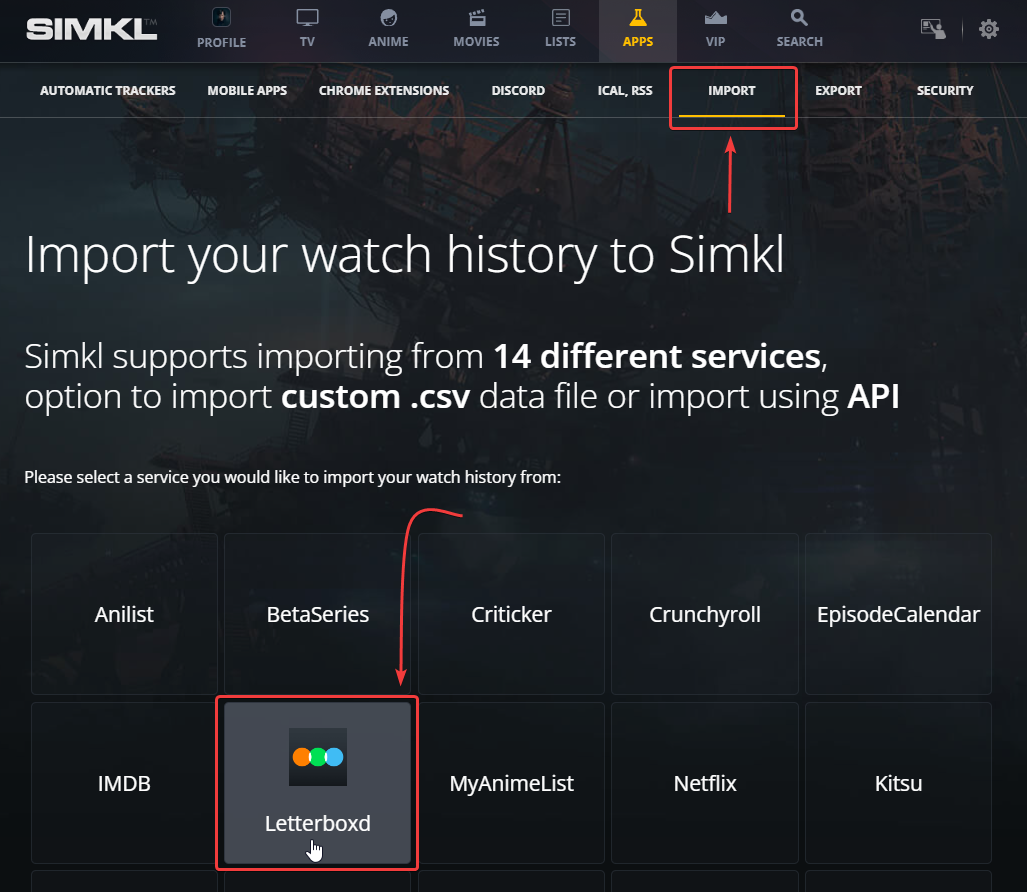
* **Navigate to Import:** Within your SIMKL account, head to the import section. Here, you'll find various import options, including Letterboxd.
{% content-ref url="/pages/RcMT7ws3nReEBKt4MIq8" %}
[Importing to Simkl](/how-to-use-simkl/advanced-usage/import-export-data/importing-to-simkl.md)
{% endcontent-ref %}
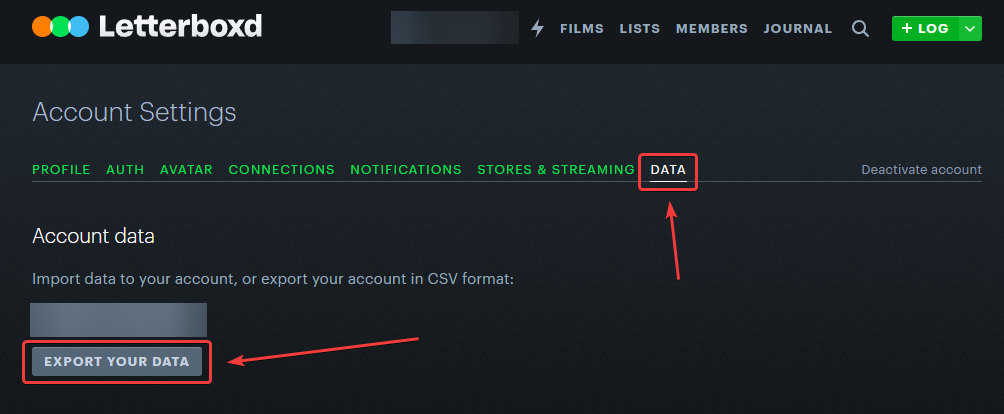
* **Download Letterboxd Export Data:** To start the process, you'll need to download your Letterboxd export data in a zip file.\
\
**Login and Visit Letterboxd's export settings (**[**https://letterboxd.com/data/export/**](https://letterboxd.com/data/export/)**).**
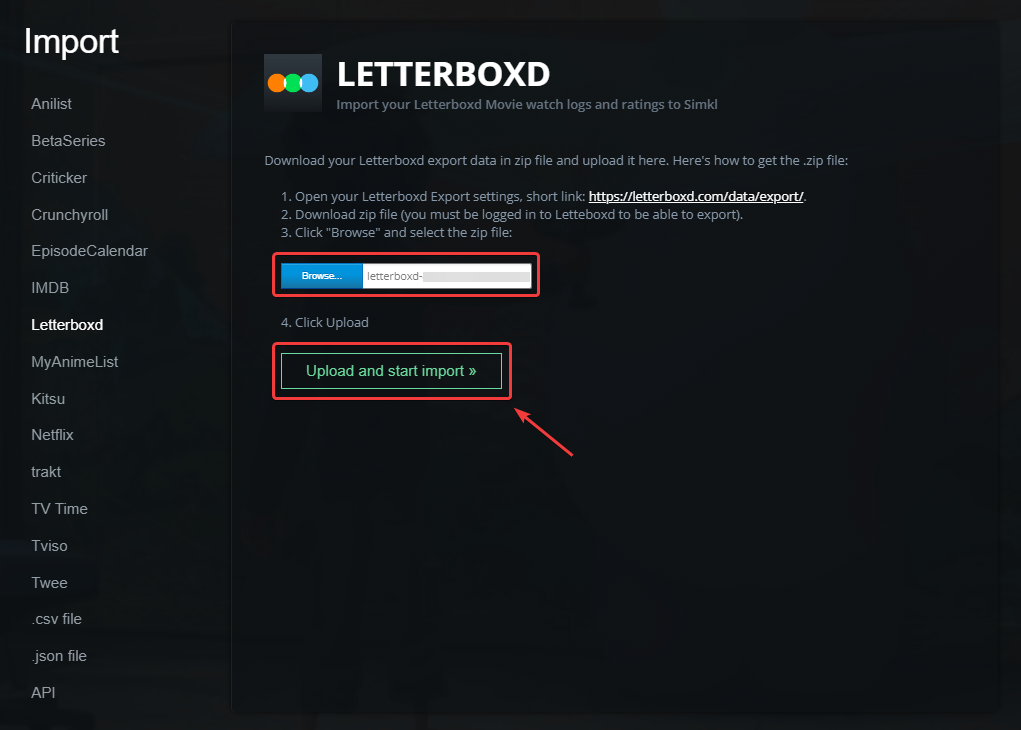
* **Upload the Zip File:** Once you've downloaded the zip file, click "Browse" on SIMKL's import page and select the zip file you just downloaded from Letterboxd.
* **Effortless Import:** With a simple click, SIMKL imports your Letterboxd watch history, ensuring a smooth transition of your movie preferences.
## **Benefits of Importing to SIMKL from LetterBoxd:**
{% content-ref url="/pages/yES6G8oKAT94ucQ0i1Rm" %}
[Benefits of Using Simkl](/how-to-use-simkl/about/what-is-simkl/benefits-of-using-simkl.md)
{% endcontent-ref %}
* **Comprehensive Tracking:** SIMKL becomes your one-stop destination for managing your movie watch history alongside TV shows and anime preferences.
* **Enhanced Recommendations:** SIMKL's recommendation engine utilizes your imported data to suggest new movies based on your imported Letterboxd history.
* **Effortless Transition:** The import process eliminates manual entry, saving you time and ensuring a smooth experience.
## **Why SIMKL Is Your Ultimate Tracking Hub:**
SIMKL goes beyond tracking by offering an immersive entertainment experience. With its user-friendly interface, cross-platform synchronization, and ongoing enhancements, it's designed to streamline your entertainment tracking and exploration.
In conclusion, importing your Letterboxd watch history to SIMKL is a significant step toward a more streamlined and enriched movie tracking journey. It simplifies your tracking process, unlocks personalized recommendations, and ensures you have a comprehensive overview of your movie preferences. Embark on this seamless transition today and explore the world of entertainment tracking with SIMKL.
If I import my Letterboxd file, will it overwrite my existing Simkl logged dates if the dates are different?
Nope, importing your Letterboxd zip won't overwrite the watched dates you already have on Simkl.
For any film that's already in your Simkl list, the import leaves your existing watched date and rating alone. The Letterboxd dates/ratings only get written for films that aren't in your list yet (those get added fresh with the date from the CSV).
The one edge case: if you literally *just* logged something on Simkl in the \~20 minutes before clicking Import, that very recent timestamp can be replaced by the Letterboxd date — but anything older than that is preserved.
If you actually want the Letterboxd dates to win, you'd need to either remove those titles from Simkl first or edit the dates manually afterward from your profile activity.
{% content-ref url="/pages/DZu1ciFHASX5wHSfFJNb" %}
[FAQ / Troubleshooting](/how-to-use-simkl/advanced-usage/import-export-data/importing-to-simkl/faq-troubleshooting.md)
{% endcontent-ref %}
---
# Agent Instructions
This documentation is published with GitBook. GitBook is the documentation platform designed so that both humans and AI agents can read, navigate, and reason over technical content effectively. Learn more at gitbook.com.
## Querying This Documentation
If you need additional information that is not directly available in this page, you can query the documentation by asking a question.
Perform an HTTP GET request on the following URL with the `ask` and `goal` query parameters:
```
GET https://docs.simkl.org/how-to-use-simkl/advanced-usage/import-export-data/importing-to-simkl/supported-platforms/letterboxd.md?ask=&goal=
```
`ask` is the immediate question: it should be specific, self-contained, and written in natural language.
`goal` is what the user is ultimately trying to achieve, the reason they need the answer. Sharing it helps GitBook give you a better, more relevant answer. A goal is most helpful when it describes the outcome the user wants rather than restating the question. For example, with `ask=how do I create an API token`, a goal like `automate deployments from our CI pipeline` lets GitBook tailor the answer to that use case.
The response will contain a direct answer to the question and relevant excerpts and sources from the documentation.
Use this mechanism when the answer is not explicitly present in the current page, you need clarification or additional context, or you want to retrieve related documentation sections.