> For the complete documentation index, see [llms.txt](https://docs.simkl.org/how-to-use-simkl/llms.txt). Markdown versions of documentation pages are available by appending `.md` to page URLs; this page is available as [Markdown](https://docs.simkl.org/how-to-use-simkl/core-features/quick-sharing/clipboard-feature.md).
# Clipboard Feature
Export Your SIMKL Lists!
The Clipboard feature on [SIMKL.com](https://simkl.com/) is a nifty tool that simplifies your entertainment experience by allowing you to easily **copy and manage your favorite** TV shows, Movies, and Anime effortlessly.
This feature has been significantly upgraded to move beyond simple copy–paste.
What was previously a basic export tool is now a **powerful, context-aware clipboard system** that lets you copy visible results from any page into **structured formats, social-ready layouts, AI prompts, and note-taking apps** all from a single popup.
Imagine having a virtual clipboard where you can easily copy your TV series, movies, anime, or even your custom lists that you want to export easily.
That's precisely what the Clipboard feature in SIMKL offers!
* **Quick and Easy Exports**
* **Share with friends & family**
* **Easily shareable on various supported social media sites**
{% hint style="warning" %}
The clipboard feature is a SIMKL v2 Beta Feature
{% endhint %}
{% content-ref url="/pages/C8Jb4JTOOuVKdHUvPKiU" %}
[Get AI recommendations for your custom list using ChatGPT](/how-to-use-simkl/core-features/quick-sharing/clipboard-feature/get-ai-recommendations-for-your-custom-list-using-chatgpt.md)
{% endcontent-ref %}
***
## What Is the SIMKL Clipboard?
The Clipboard is a **temporary, on-demand workspace** that lets you collect and copy titles from SIMKL without creating permanent lists.
Key principles:
* Fast and disposable
* Works on *visible results* (what you’re currently viewing)
* Optimized for exporting, sharing, and analysis
* Does **not** affect your lists, progress, or stats
Think of it as:
> *“Select → Shape → Copy → Share/Use anywhere”*
{% hint style="info" %}
### New Clipboard Popup (What Changed)
Clicking **Copy to Clipboard** now opens a **dedicated popup** with advanced options instead of immediately copying raw text.
#### The new popup lets you:
* Choose *how many items* to copy (10, 20, 50, 100, or all loaded)
* Preview, output formats before copying
* Switch between format categories instantly
* Copy once, paste anywhere
This makes Clipboard feel like a **formatting tool**, not just a copy button.
{% endhint %}
## How to use the Clipboard Export Feature on SIMKL?
The Clipboard Export feature on SIMKL is a handy tool that allows you to take your entertainment organization to the next level.
It enables you to export your personalized Clipboard lists, ensuring you have easy access to your favorite shows and movies, even outside the SIMKL platform.
Here's a simple guide on how to use the Clipboard Export feature:
* **Create Your Clipboard:** First, make sure you have added TV Shows / Movies / Anime in your list the use the Clipboard function. You can do this by clicking the "**Clipboard"** button whenever you come across something you want to copy. \
\
(***Refer to the image below to find this button***)
From Discover Page Example
From User Profile Page Example
From Lists Page
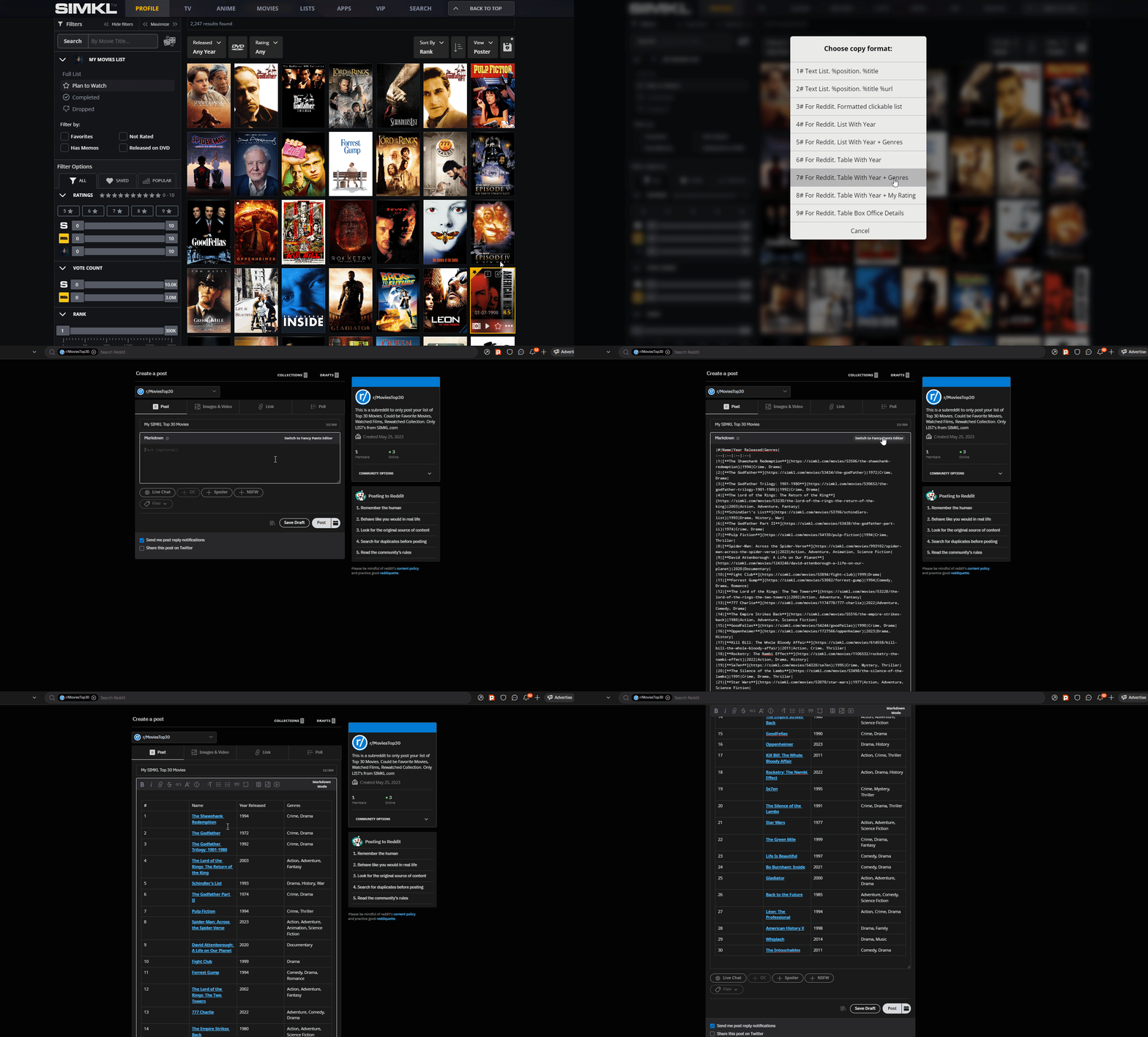
* **Select a Copy Format:** We currently have few different types of formats on SIMKL where you can copy to clipboard, reddit being the most popular one!
You just have to select on - any - one - type that you feel is the best output for you!
### **Preview Example of Different Format:**
* **Paste In Your Destination:** After Your Desired Copy Format is Selected, can paste your export format from SIMKL and share it with your friends & family!
***
### Format Categories in the New Clipboard
The updated Clipboard introduces **format categories**, each designed for a specific workflow.
Instead of copying raw text and fixing it later, you can now choose **exactly how your data should be structured** before copying it.
#### 1. Social & Share Formats
**Social & Share** formats are optimized for **human-readable sharing** across communities, chats, and social platforms. These formats prioritize clarity, clean layout, and compatibility with common posting styles.
Available formats include:
* **Titles only** – a clean numbered list of names
* **URLs only** – direct SIMKL links without extra text
* **Title + URL** – readable lists with clickable links
* **Discord code block** – monospaced formatting that pastes cleanly into Discord
* **Reddit markdown links** – properly formatted Reddit links, with optional year display
These formats automatically:
* Preserve the current sort order
* Respect the number of visible items
* Avoid unnecessary metadata clutter
**Common use cases**
* Sharing recommendations in Discord servers
* Posting curated lists on Reddit
* Sending quick watch suggestions to friends
* Creating clean, readable lists for forums or chat apps
This category is ideal when your goal is **communication**, not data processing.
***
#### 2. Ask AI (New)
The **Ask AI** category is one of the most significant upgrades to the Clipboard.
Instead of copying a list and manually explaining it to an AI, SIMKL now generates **ready-to-use prompts** that include both your titles and the correct context.
Each option produces a **pre-structured prompt** designed to be pasted directly into AI tools such as ChatGPT or Claude or Grok or Meta.
Available prompt types include:
* **Get Recommendations**\
Uses your selected titles to ask AI for similar movies, shows, or anime.
* **Hidden Gems**\
Focuses on discovering lesser-known or underrated titles related to your list.
* **Family Filter**\
Asks AI to categorize titles into *safe* vs *avoid* for family or kids.
* **Director Match**\
Analyzes directors across your list and identifies patterns or overlaps.
* **Roast My Taste**\
A lighthearted option that asks AI to critique your viewing habits.
* **Analysis Payload (JSON)**\
Exports structured JSON data optimized for AI analysis, scripting, or deeper reasoning.
All AI prompts are:
* **Pre-formatted** (no manual cleanup needed)
* **Context-aware** (based on your selected titles)
* **Neutral and reusable** (works across different AI platforms)
This turns the Clipboard into an **AI handoff tool**, allowing SIMKL to act as a starting point for discovery, analysis, and insight not just tracking.
***
#### 3. Export Formats
**Export formats** are designed for users who need **structured data**, not presentation.
These formats prioritize machine-readability and consistency.
Available export options include:
* **Plain text** – simple, minimal output
* **CSV-style output** – spreadsheet-friendly structure
* **JSON payloads** – structured data with fields and identifiers
* **ID-based exports** – SIMKL IDs for integrations or scripts
These formats are best suited for:
* Backups of filtered results
* External tools and services
* Custom scripts or automation
* Spreadsheet analysis and sorting
* Advanced users working with APIs or datasets
Unlike Social formats, Export formats may include:
* IDs
* Years
* Internal structure
* Stable ordering for processing
This category exists for **precision and reuse**, not readability.
#### 4. Note Apps (New)
The **Note Apps** category bridges SIMKL with **personal knowledge systems**.\
Instead of pasting raw lists and reformatting them manually, Clipboard now outputs content tailored for popular note-taking tools.
Currently supported formats:
* **Obsidian-friendly Markdown**
* **Notion-ready lists**
These formats are optimized to:
* Paste cleanly without breaking layout
* Preserve hierarchy and readability
* Fit naturally into long-term notes
They intentionally avoid:
* Excess metadata
* Platform-specific clutter
* Formatting that requires manual cleanup
**Ideal use cases**
* Personal watch journals
* Media research notes
* Long-term recommendation archives
* Knowledge bases outside SIMKL
* Tracking themes, directors, or genres over time
This makes Clipboard useful not only for sharing or exporting, but also for **thinking and documenting**.
***
**1# Text List - (Position + Title) only - Below Image as an example of Output**
**2# Text List - (Position + Title + URL) only - Below Image as example of Output**
**3# For Reddit Formatted Clickable Link Lists**
**4# For Reddit Format - List With Year**
**5# For Reddit Format - List With Year + Genres**
**6# For Reddit Table Format - List With Year**
**7# For Reddit Table Format - List With Year + Genres**
**8# For Reddit Table Format - List With Year + My Rating**
**9# For Reddit Table Format - Box Office Details**
The Clipboard Export feature on SIMKL empowers you to have your entertainment preferences at your fingertips.
Whether you want to have a backup of your lists or share recommendations with others, this feature makes it all possible.
In conclusion, using the Clipboard Export feature on SIMKL is a breeze.
By following these simple steps, you can easily export your curated lists and stay connected to your favorite shows and movies wherever you go.
So, start using the Clipboard Export feature today and make your entertainment journey even more enjoyable! Happy organizing!
### For Reddit Posts & Comments
***Yes, it also can be used in Reddit comments***
The Clipboard Export feature from SIMKL.com is a game-changer for Reddit users who love discussing TV shows and movies. It offers incredible usefulness and advantages when it comes to creating Reddit posts and comments that are well-informed and engaging.
Its ability to provide easy access to watchlists, custom lists, quick recommendations, box office details, and effortless commenting enhances the Reddit experience. So, if you're an active Reddit user passionate about entertainment, make the most of this feature and join the vibrant discussions with confidence!
## Are You Looking for More Formats in Clipboard?
{% hint style="info" %}
Connect with us on our Discord server , if you are looking for more other **types of formats to export your list or have ideas!**
{% endhint %}
{% content-ref url="/pages/bkA5mhcTMKjTmx8e8B0d" %}
[How do I contact support?](/how-to-use-simkl/get-in-touch-with-us/how-do-i-contact-support.md)
{% endcontent-ref %}
{% content-ref url="/pages/eLXrc5780QlVMRRTNPRI" %}
[Social Media & Profiles](/how-to-use-simkl/get-in-touch-with-us/social-media-and-profiles.md)
{% endcontent-ref %}
---
# Agent Instructions
This documentation is published with GitBook. GitBook is the documentation platform designed so that both humans and AI agents can read, navigate, and reason over technical content effectively. Learn more at gitbook.com.
## Querying This Documentation
If you need additional information that is not directly available in this page, you can query the documentation by asking a question.
Perform an HTTP GET request on the following URL with the `ask` and `goal` query parameters:
```
GET https://docs.simkl.org/how-to-use-simkl/core-features/quick-sharing/clipboard-feature.md?ask=&goal=
```
`ask` is the immediate question: it should be specific, self-contained, and written in natural language.
`goal` is what the user is ultimately trying to achieve, the reason they need the answer. Sharing it helps GitBook give you a better, more relevant answer. A goal is most helpful when it describes the outcome the user wants rather than restating the question. For example, with `ask=how do I create an API token`, a goal like `automate deployments from our CI pipeline` lets GitBook tailor the answer to that use case.
The response will contain a direct answer to the question and relevant excerpts and sources from the documentation.
Use this mechanism when the answer is not explicitly present in the current page, you need clarification or additional context, or you want to retrieve related documentation sections.